Digital products
Selling downloads: attaching files and choosing who gets which.
A digital product is delivered as files instead of a parcel: a recording, an e-book, a set of sheet music. The buyer gets a link in their confirmation email, personal to them, that downloads the files they paid for.
Whether your store can sell downloads depends on how it was set up. If the product page says Download storage is not configured, ask whoever looks after the store.
Set one up
- Create the product as usual (see Products and variants), choosing Digital download — files as its Kind.
- Add its variants first. A digital product still needs at least one — it carries the price — and a file is only ever reached through a variant. If you sell one thing, one variant with no options is enough. If you sell the same recording as audio and as video, name an option Format and add a variant for each.
- Under Add a file, choose the file, give it a Title (or leave it for the filename), and tick which variants it is Included in. Click Upload file. Files can be large — audio, video, PDF — up to a few gigabytes; the page shows the limit.
- Repeat for every file.
A file with no variant ticked is stored, but nobody can download it. That tick list is what decides who gets what: for an audio + video bundle, add a third variant and tick both files against it, without uploading anything twice.
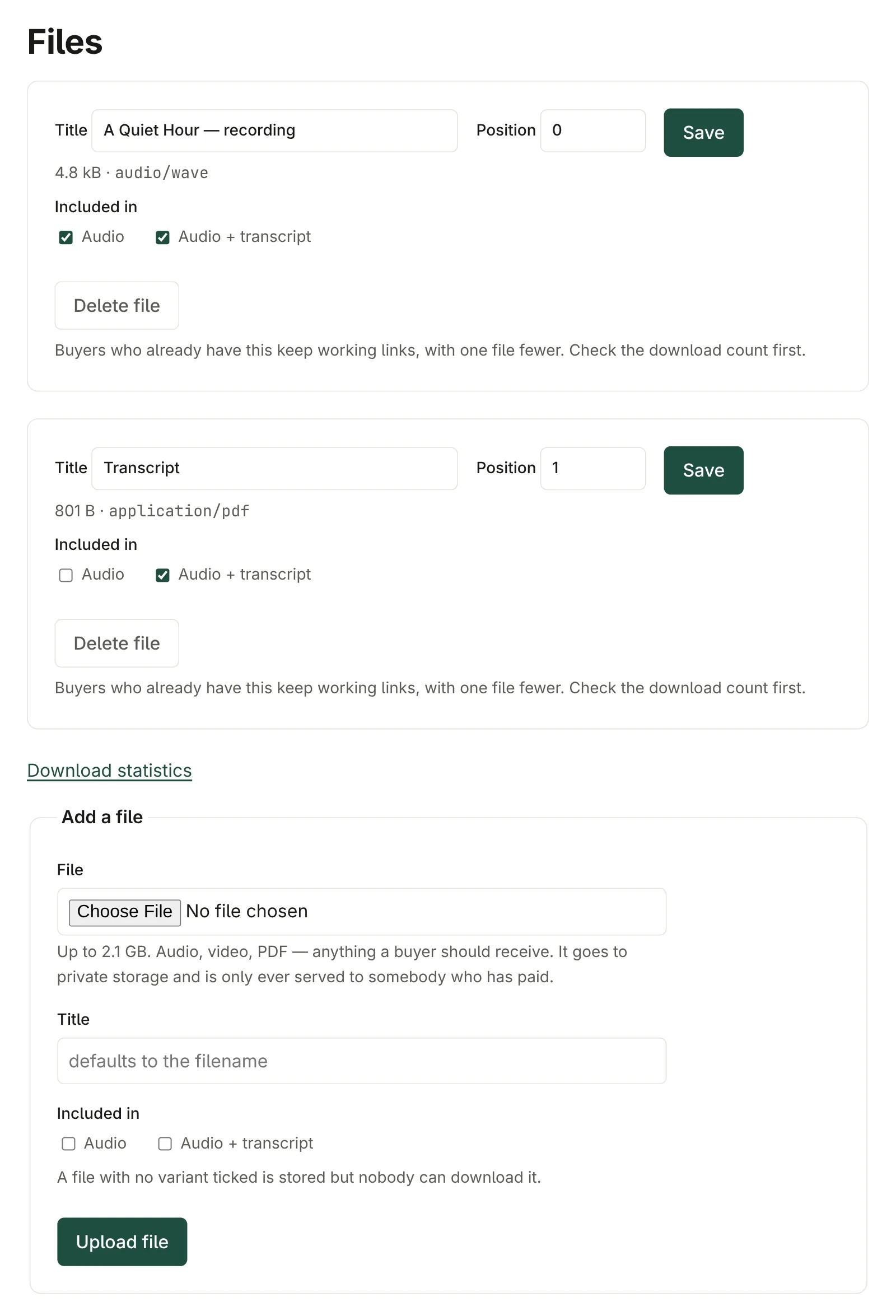
Each file's Position sets the order it is listed in on the buyer's download page.
What the buyer gets
When an order is paid, the buyer's confirmation email holds a download link. It opens a page listing their files; each click is checked and counted before the file is sent, and the link to the file itself expires within minutes, so a link copied out of the browser is no use to anybody else.
Changing files after people have bought
- Adding a file to a variant gives it to everyone who bought that variant, past and future.
- Deleting a file removes it for everyone; buyers keep working links to the rest.
- To stop one buyer downloading — a refund, say — revoke their access on their order instead. See Orders.
Download statistics
On the product's page, Download statistics shows how many times each file has been downloaded, by how many buyers, and the most recent downloads.
Physical or digital?
A product's Kind cannot be changed once it has been ordered, or while a digital product still has files attached. If you chose wrongly, delete the files first — or, for a product that has sold, make a new one.